

Introduction
If you want to export goods or services from India, the very first registration you need — before anything else — is your Importer Exporter Code (IEC). Without it, customs will not allow your Shipping Bill to be processed. Your bank will not convert your export payments. Every DGFT scheme you try to apply for — RoDTEP, Advance Authorisation, EPCG — requires it as a prerequisite.
The good news is that in 2026, getting your IEC is faster, cheaper, and easier than it has ever been. The entire process is online, costs ₹500, and in most cases your IEC certificate lands in your inbox within 24–48 hours of submitting a correct application.
I have helped dozens of first-time exporters get their IEC, and the mistakes I see are almost always the same — a name that doesn't exactly match the PAN card, a savings account submitted instead of a current account, or an Aadhaar that isn't linked to an active mobile number. This guide will walk you through every step so you get it right the first time and avoid the 5–10 day delay that comes with a rejection and reapplication.
What Is an IEC Code?
The Importer Exporter Code (IEC) is a 10-digit alphanumeric identification number issued by the Directorate General of Foreign Trade (DGFT) under India's Ministry of Commerce and Industry. It is the primary identifier for your business in all foreign trade transactions — exports, imports, and all related government scheme applications.
Think of it as your business's passport for international trade. Just as a passport identifies you to foreign governments, your IEC identifies your business to Indian customs, the RBI (through the EDPMS export monitoring system), and every government body involved in regulating India's foreign trade.
A few key facts that every exporter should know about IEC:
- It is linked to your PAN: One IEC per PAN number. A sole proprietor uses their personal PAN. A company uses the company PAN. You cannot have two IEC codes under the same PAN — if you accidentally get two, you must surrender one.
- It has lifetime validity: No expiry date, no renewal fee. But you must complete an annual update on the DGFT portal between April 1 and June 30 every year, even if nothing has changed. Two consecutive missed updates trigger automatic deactivation.
- It covers all your products: One IEC covers all the products you export or import. You do not need a separate IEC for each product category.
- The fee is a one-time ₹500: There are no annual fees. The ₹500 application fee is paid once during registration.
Who Needs an IEC Code?
IEC is mandatory for:
- Any individual or business entity that exports goods from India commercially
- Any individual or business entity that imports goods into India commercially
- Service exporters who want to claim DGFT benefits (like SEIS) or need IEC for banking purposes
- Businesses selling on international e-commerce platforms (Amazon Global, eBay, Etsy) — your logistics partner or customs broker will require your IEC
IEC is not required for:
- Individuals exporting goods for purely personal use (not for sale or commercial purposes)
- Central and state government departments (they use a notified government IEC)
- Certain notified charitable organisations exporting donated goods
If you are reading this guide with the intention of building an export business, you need an IEC. There are no meaningful exceptions for commercial exporters.
Documents Required for IEC Code Registration
The documents you need depend on your business structure. Prepare all of these before you start the online application — the process moves quickly once you begin, and having documents ready prevents you from getting stuck mid-application with a session timeout.
All document uploads must be in JPG, PNG, or PDF format, and each file should be under 5 MB. Ensure every document is clearly legible — blurry scans are one of the most common reasons for rejection.
Sole Proprietorship
- PAN Card of the proprietor — personal PAN, not a business PAN
- Aadhaar Card of the proprietor — must be linked to an active mobile number for OTP e-sign
- Cancelled cheque of current bank account — the account must be in the business name (or proprietor's name for sole prop). Savings accounts are rejected — it must be a current account.
- Business address proof — electricity bill, rent agreement, or property tax receipt showing your business address
- Passport-size photograph (in some cases — upload as a digital image)
Partnership Firm
- PAN Card of the firm — the firm's PAN, not a partner's personal PAN
- PAN and Aadhaar of the managing/authorised partner
- Partnership deed — registered or notarised
- Cancelled cheque of the firm's current bank account
- Business address proof
Private Limited Company / One Person Company (OPC)
- PAN Card of the company
- Certificate of Incorporation from MCA
- PAN and Aadhaar of the authorised director (the one who will sign the IEC application)
- Cancelled cheque of the company's current bank account
- Registered office address proof — utility bill, rent agreement, or property document showing the registered address
LLP (Limited Liability Partnership)
- PAN Card of the LLP
- LLP Incorporation Certificate from MCA
- PAN and Aadhaar of the designated partner
- Cancelled cheque of the LLP's current bank account
- Registered office address proof
One important note on the bank account: it must be a current account. The DGFT system explicitly validates that the account type is current, not savings. Many sole proprietors make the mistake of submitting their savings account details — this leads to automatic rejection. Open a current account in your business name first if you have not already done so.
IEC Code Registration: Step-by-Step Process on the DGFT Portal
Here is the complete application process as it stands on the DGFT portal in 2026. Follow each step in sequence.
Step 1: Go to the DGFT Portal
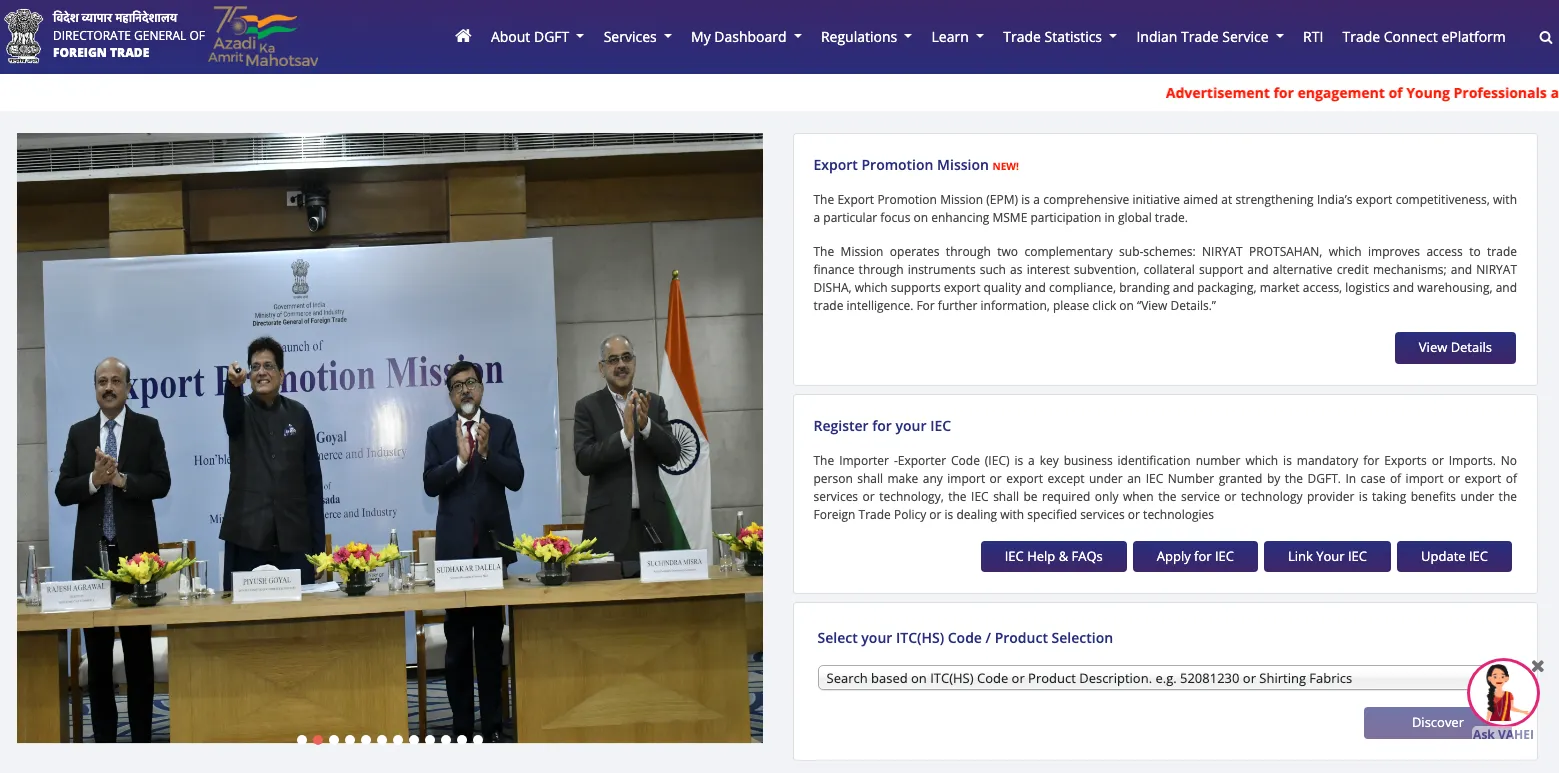
Open dgft.gov.in in your browser. Use Google Chrome or Microsoft Edge — the portal has known compatibility issues with Firefox and Safari. If the page loads slowly, refresh and try again. DGFT portal traffic is heavy during peak hours (10am–12pm and 3pm–5pm IST).
Step 2: Create an Account or Log In
If you are a new user, click "Register" on the top right of the DGFT homepage. Enter your mobile number, email address, and create a password. Verify both your mobile number and email via separate OTPs that will be sent to each. This registration is for your personal DGFT account — it is linked to your Aadhaar and PAN, not to a specific business.
If you already have a DGFT account (perhaps from a previous IEC application or DGFT scheme), simply log in with your existing credentials.
Step 3: Navigate to IEC Services
After logging in, look at the top navigation bar. Click on "Services". In the dropdown, you will see "IEC Profile Management". Click on it. This takes you to the IEC dashboard where you can see any existing IEC linked to your account, or begin a new application.
Step 4: Start a New IEC Application
On the IEC Profile Management page, click "Apply for IEC". This opens the IEC application form. Do not close this window or navigate away while filling the form — the session has a timeout, and if it expires mid-application, you may need to start over.
Step 5: Enter Your PAN and Verify
The very first field in the application is your PAN number. Enter it carefully. When you enter the PAN and proceed, the system automatically fetches your name from the Income Tax database. This is a critical step — the name that appears must match your PAN card exactly.
Common name discrepancy issues:
- Your PAN says "RAJESH KUMAR SHARMA" but you type "Rajesh K. Sharma" — rejected
- Your PAN has your middle name abbreviated but you enter the full form — rejected
- Your company PAN says "ACME EXPORTS PVT LTD" but you enter "Acme Exports Private Limited" — rejected
The system is not intelligent about name variations. It does an exact string match. If the name that auto-populates from your PAN is correct, you are fine. If it shows a name that doesn't match your PAN card — do not proceed. Contact the IT department for a PAN correction first.
Step 6: Select Entity Type and Fill Business Details
Select your entity type from the dropdown: Proprietorship, Partnership, Private Limited Company, LLP, Trust, Society, or Government. This selection determines what documents will be required.
Fill in the following details carefully:
- Business/company name (for sole proprietorship, this is your trading name if you have one — but the legal name will be your personal name)
- Nature of business activity — select Exporter, Importer, or Both
- Date of establishment
- Registered business address (must match your address proof document exactly)
- Business email address and phone number
Step 7: Enter Bank Account Details
Enter your current account details:
- Account number
- IFSC code
- Bank name and branch name
Double-check your IFSC code on the RBI's official IFSC search at rbi.org.in or on your bank's cheque leaf — do not rely on Google as IFSC codes can change when banks merge branches. Upload your cancelled cheque as proof.
The bank account you enter here will later be registered on ICEGATE for customs clearance (AD Code registration) and will be the account where your RoDTEP scrips, Duty Drawback, and GST refunds are processed. Getting this right matters beyond just the IEC application.
Step 8: Add Directors / Partners (For Companies and LLPs)
If you are registering as a company or LLP, this step requires you to add all directors or designated partners. For each person, you will need to enter their name, designation/DIN, PAN, Aadhaar number, and contact details.
At least one director's Aadhaar must be linked to an active mobile number — this person will complete the e-sign step at the end of the application. Decide who this will be before you start, and ensure their Aadhaar is mobile-linked.
Step 9: Upload Documents
Upload all the required documents as per your entity type (listed in the previous section). Tips for successful uploads:
- Scan at minimum 150 DPI — high enough to be legible but not so large that files exceed 5 MB
- Ensure the entire document is visible — no cropped corners, no text cut off at the edges
- For PAN and Aadhaar — both sides of the card must be visible in the upload
- For the cancelled cheque — the account number, IFSC, and your name must all be clearly readable
- Do not upload password-protected PDFs — the system cannot read them
Step 10: Pay the Application Fee
The IEC registration fee is ₹500. Click "Proceed to Payment" and pay via net banking, UPI, credit card, or debit card on the DGFT payment gateway. Download and save the payment receipt — you will need it if you ever need to raise a grievance about the application.
Step 11: Submit via Aadhaar OTP or DSC
This is the final step — digitally signing your application. You have two options:
- Aadhaar OTP e-sign (simpler): Enter the Aadhaar number of the applicant/authorised director. The system sends an OTP to the Aadhaar-linked mobile number. Enter the OTP within the validity window (typically 10 minutes). The application is submitted.
- DSC (Digital Signature Certificate): If you have a Class 2 or Class 3 DSC dongle, you can use this instead of Aadhaar OTP. Preferred for company applications where the Aadhaar OTP route is sometimes less stable.
For most individual and proprietorship applicants, Aadhaar OTP is simpler and faster. Ensure your phone (with the Aadhaar-linked number) is with you when you reach this step.
Step 12: Receive Your IEC Certificate
After successful submission, you will see a confirmation screen with your application reference number. The DGFT system processes your application automatically — there is no manual review for standard applications. In most cases, your IEC certificate is generated and sent to your registered email within 1–2 working days.
The certificate is a digitally signed PDF showing your 10-digit IEC number, your business name and address, the date of issue, and the DGFT regional authority that issued it. Download it, save it, and share a copy with your CHA (Customs House Agent), your bank's trade finance desk, and your EPC when applying for RCMC.
How to Download Your IEC Certificate at Any Time
You do not need to keep the email. Your IEC certificate is always available for download from the DGFT portal:
- Log in to dgft.gov.in
- Go to Services → IEC Profile Management
- Your IEC details will be displayed on the dashboard
- Click "Print IEC" to download the certificate as a PDF
This is useful when you need to share your IEC with buyers, banks, or government agencies and cannot find the original email.
The Annual IEC Update — Non-Negotiable
This is the single most important compliance requirement that IEC holders overlook, and it catches experienced exporters off guard every year.
Starting from 2021, DGFT made it mandatory for all IEC holders to confirm their IEC details annually between April 1 and June 30. This is not an application — it is a confirmation. You log in, check that your business name, address, bank account, and director details are correct, and click submit. If nothing has changed, the whole process takes less than 5 minutes and costs nothing.
If you miss this annual update for two consecutive years, your IEC is automatically deactivated by the system. A deactivated IEC means:
- ICEGATE rejects your Shipping Bills — your exports stop
- Your bank's trade finance system flags your account — foreign remittances get held
- DGFT scheme applications get rejected automatically
Reactivating a deactivated IEC requires logging in to the DGFT portal and completing the missed annual updates — it usually takes 1–3 working days. But those days can be catastrophically disruptive if you have a shipment ready to go or an export order deadline approaching.
Set a calendar reminder on April 1st every year. Five minutes of your time in April protects your entire export operation for the next 12 months.
How to Modify Your IEC When Business Details Change
Your IEC details must always reflect your current business information. Whenever any of the following change, update your IEC on the DGFT portal:
- Business address (including pincode changes)
- Bank account or branch
- Directors or partners (addition, removal, or change)
- Business email or phone number
- Company name (after rebranding or legal name change)
To modify: Log in to DGFT → Services → IEC Profile Management → Modify IEC. Make the changes, upload supporting documents for the change (for example, a new bank certificate if changing the bank account, or a board resolution for director changes), and submit via Aadhaar OTP or DSC. Modification is free and typically processed within 1–2 working days.
Do not wait to update. A mismatch between your IEC details and your actual business details can cause customs queries, bank payment holds, and DGFT scheme rejections.
IEC vs GSTIN — Do You Need Both?
Yes, you need both — and they serve completely different purposes.
Your IEC is your foreign trade identity. It is used for customs clearance on ICEGATE, foreign trade scheme applications on DGFT, and as the reference for your export transaction in India's foreign trade statistics.
Your GSTIN is your tax identity. It is used for GST compliance — filing returns, issuing invoices, claiming input tax credit, and zero-rating your exports. Your export invoice must carry both your IEC and your GSTIN.
The two are linked in the system — when you file your Shipping Bill on ICEGATE, you enter both your IEC and GSTIN. When you file your GSTR-1 with export invoice details (including Shipping Bill numbers), the system links the data across both platforms to process your IGST refund.
Getting GST registration alongside IEC is not optional for any exporter who wants to claim zero-rated export status, file LUT, or receive GST incentives. Apply for both simultaneously — they are independent processes that can run in parallel.
Common Reasons IEC Applications Get Rejected
Based on the most frequent issues I have seen, here are the rejection reasons you need to actively prevent:
PAN Name Mismatch
This is the number one rejection reason. The name you enter in the application is compared against the Income Tax database using your PAN number. If there is any difference — an extra space, a different abbreviation, a missing initial, a different order of words — the application fails.
The fix: Before typing anything, check your PAN card. Type the name exactly as it appears on the card — character by character. If your PAN says "SHARMA RAJESH KUMAR", enter it that way, not "Rajesh Kumar Sharma" (even though they refer to the same person).
Savings Account Submitted
The bank account type in your IEC must be "current." The DGFT system validates this against bank records. A savings account will be rejected without exception. If you do not have a current account yet, open one first — most banks can open a current account within 2–5 working days.
Aadhaar OTP Failure
This happens when your Aadhaar is not linked to the mobile number you are currently using, or when the mobile number linked to your Aadhaar is an old number you no longer have access to. To fix: visit the nearest Aadhaar Seva Kendra with your Aadhaar card and new mobile number. The mobile number update takes 1–3 working days. After that, reapply.
Address Proof Mismatch
The address on your uploaded address proof document must match what you enter in the application form exactly. If your electricity bill shows "42, MG Road" but you type "42 MG Road" (without the comma), it may or may not cause an issue depending on how strictly the system flags it. To be safe — copy the address character for character from your address proof document.
Poor Quality Document Scans
Blurry, dark, or partially cropped documents. The system's automated document reading and any manual review both require clearly legible documents. Scan in good lighting at 150 DPI minimum. If a document has fine print (like an electricity bill), ensure the account number and address are both clearly readable.
Corporate Applicant Using Personal PAN
A private limited company must use the company's PAN — not a director's personal PAN. The IEC for a company is linked to the company's PAN. This is a surprisingly common mistake from first-time company directors applying for IEC.
What Happens After You Get Your IEC
Getting your IEC is step one of your export setup, not the finish line. Here is what to do immediately after receiving your IEC:
Register your AD Code: Your IEC must be linked to customs through an AD Code (Authorised Dealer Code) registration. This is done through your bank — request a bank certificate with your AD Code details, then submit it to your nearest customs house (through your CHA). Without AD Code registration, you cannot file Shipping Bills. This step is often overlooked by first-time exporters.
Apply for RCMC: Take your IEC certificate to your relevant Export Promotion Council and apply for RCMC membership. Without RCMC, you cannot claim RoDTEP, Advance Authorisation, EPCG, or any FTP-based export benefit.
Apply for GST registration (if not already done): GST and IEC should ideally be applied for simultaneously. If you have IEC but not GSTIN yet, get your GST registration done immediately.
File your LUT: As soon as your GSTIN is issued, file your LUT on the GST portal for the current financial year. This enables zero-rated exports without paying IGST upfront.
Share IEC with your CHA and bank: Your CHA needs your IEC to file Shipping Bills. Your bank's trade finance desk needs it to process your export-related accounts and packing credit applications.
Frequently Asked Questions
How long is an IEC code valid?
An IEC code does not expire. It is valid for the lifetime of the business entity. However, you must complete the annual update on the DGFT portal between April 1 and June 30 every year to keep it active. Missing two consecutive years of annual updates results in automatic deactivation.
Can I have more than one IEC code?
No. Only one IEC is issued per PAN number. If you run multiple businesses under different legal entities (each with their own PAN), each entity will have its own IEC. But a single PAN — whether individual or company — can have only one IEC. If you somehow end up with two IECs under the same PAN, you must surrender one.
Is IEC required for export of services?
IEC is generally not mandatory for service exporters if they are not claiming DGFT scheme benefits. However, many banks request an IEC before processing foreign inward remittances as export proceeds. And if you want to claim benefits like SEIS (Service Exports from India Scheme), you need an IEC. The practical advice: get an IEC regardless. At ₹500 and 48 hours, there is no reason not to.
What if my IEC application is stuck for more than 5 days?
Log in to the DGFT portal and check the application status under IEC Profile Management. If the status shows "Under Process" for more than 5 working days, raise a grievance on the DGFT portal (Services → Raise Grievance). You can also call the DGFT helpdesk at 1800-111-550 (toll-free) or email dgfthelp@nic.in with your application reference number.
Can a minor get an IEC?
No. The applicant or the authorised representative (director/partner) must be an adult. For businesses owned or operated by minors, a guardian would need to be the registered entity owner until the minor reaches adulthood.
I am an NRI — can I get an IEC for a business in India?
Yes, NRIs can get an IEC for a business incorporated in India. The IEC is issued for the business entity (Pvt Ltd, LLP, etc.) registered in India — not for the individual. The company must have a resident Indian director as required by the Companies Act. The IEC application is submitted in the company's name using the company's PAN.
My IEC was deactivated because I missed the annual update. How do I reactivate it?
Log in to the DGFT portal → Services → IEC Profile Management. You should see a "Reactivate IEC" option or be prompted to complete the pending annual updates. Complete the updates for the missed years and submit. Reactivation typically takes 1–3 working days. Importantly, there is no fine or penalty for missing the annual update — reactivation is free.
Conclusion
The IEC Code is the foundation of your entire export identity in India. Without it, nothing else in the export ecosystem works — not Shipping Bills, not bank remittances, not government scheme benefits, not RoDTEP, not Drawback, nothing.
The application process in 2026 is straightforward and fast. Get your current account open, have your documents ready, type your PAN name exactly as it appears on your PAN card, and ensure your Aadhaar is linked to an active mobile number. With those four things in order, your IEC will be in your inbox within 48 hours.
Once you have it, file your LUT on the GST portal, register your AD Code through your bank, and apply for RCMC from your Export Promotion Council. Those three actions complete your foundational export setup and make you ready to ship your first order.